NotchOwl
A task planner that lives in the MacBook notch
Free featured launchLaunches November 17, 2026
Quick answer
What is NotchOwl?
About NotchOwl
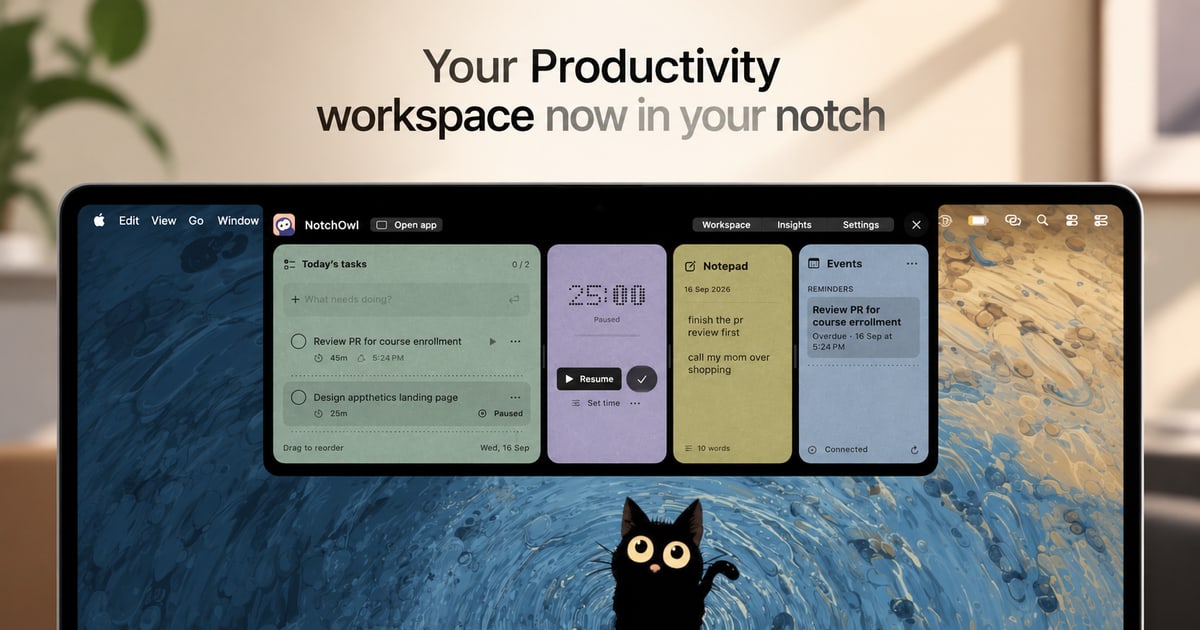
NotchOwl is a Mac utility that places a planner in the screen area around the MacBook notch, opened by hovering or by pressing Option N. It is pitched as a task manager for people with ADHD: spoken or typed thoughts become sorted tasks, and a focus timer keeps attention on one item. It also stores screenshots, shows meetings with quick joining, offers a weekly view for dragging tasks between days, and displays progress insights. Tasks sync to iPhone and Apple Watch through Apple Reminders, external monitors get their own notch, and Claude can push plans into it. Planner data stays on the Mac. An early bird lifetime license costs 12 USD for up to three Macs.
Key features
- Hover panel or keyboard shortcut to open the planner
- Voice capture that turns speech into sorted tasks
- Focus timer for one task at a time
- Week view with drag and drop scheduling
- Sync with iPhone and Apple Watch via Reminders
- Virtual notch on external monitors
Pricing details
An early bird lifetime license costs 12 USD instead of the regular 39 USD, covers up to three Macs and includes a 7 day money back guarantee.
NotchOwl at a glance
AI generated reviewNotchOwl makes use of screen space most Mac owners ignore, keeping a planner one hover away. The site positions it for people with ADHD, and the lifetime license with a refund window lowers the risk of trying it.
- Best for
- MacBook users who want quick task capture and focus tools without switching windows.
- Not ideal for
- Windows users, or teams needing shared project boards.
Pros
- Quick access without opening a separate window
- Uses Apple Reminders to reach iPhone and Apple Watch
- Planner data kept locally on the Mac
Cons
- Mac only
- Early bird price may not last
- Built for individuals, with no team features mentioned
Verdict
NotchOwl is a small, focused purchase for Mac users who lose tasks to window clutter. At its early bird price, the main question is whether the notch suits a given workflow, not the cost.
AI generated from NotchOwl’s own public pages on November 13, 2026, not yet checked by an editor. It is not a Techavy rating and carries no score. How we review
User reviews
No user reviews yet. Used NotchOwl? Upvote it above and check back as reviews open.
NotchOwl FAQ
What is NotchOwl?
NotchOwl is a Mac utility that places a planner in the screen area around the MacBook notch, opened by hovering or by pressing Option N. It is pitched as a task manager for people with ADHD: spoken or typed thoughts become sorted tasks, and a focus timer keeps attention on one item.
How much does NotchOwl cost?
NotchOwl uses a one time purchase pricing model, 12 USD one time. Check the official site for current prices.
What are some alternatives to NotchOwl?
Similar products on Techavy include Focus Valley, Tickari, TopRec, Drifty. See the full list of NotchOwl alternatives for more.
Alternatives to NotchOwl
All NotchOwl alternativesFocus Valley
Focus Valley is a Pomodoro timer that works in any browser without signup, rewarding each focused minute with sparks that count toward a global weekly ranking.
Tickari
Tickari keeps daily tasks, quick notes and checklists in a calm web app, with push and email reminders plus an optional public profile page for sharing lists.
TopRec
TopRec ranks your shortlist against the job description, writes tailored interview questions, drafts outreach, and briefs your hiring manager. Pay per job, no subscription.
Drifty
drifty goes beyond app-level tracking, using AI to understand what you do inside each app, separate focus from drift, and reveal clearer workday insights.
Free 2
Free OSHA Hazard Communication self-audit. Answer 12 questions grounded in 29 CFR 1910.1200 and get an instant compliance score, your specific gaps, and what to fix before...
Statey
Shared, structured state across Claude, Cursor, and ChatGPT. Validated records, versioned schema, every change attributed to the human or agent that made it. MCP-native,...
Related tools
- RileyRiley is an AI writing assistant for founders, personal brands, and marketing teams. Create on-brand social posts, blog posts, and newsletters from a short prom
- ChatOSSThe desktop app for Ollama. Chat, code, and plan with your local models, and scale to faster cloud models when you need them. Free local use, no account require
- threadforkSarah confirmed the Acme expansion is gated on their security review, Marcus owns the questionnaire and will return it by Friday.
- GreatarrowAsk what's late, who's waiting and where the money went, answered from your real email, calendar and docs. Then let AI do the follow-ups and scheduling.
- HeydeaconSupport your users as though you were in the room. Deacon answers questions, guides them through your product, and tells you what they want to achieve.
- Local MCPLocal MCP (LMCP) gives your AI direct access to Mac apps, no code, no APIs. Mail, Calendar, Teams, OneDrive, Excel and more. 100% local, GDPR compliant.
- Willow VoiceFast, accurate voice dictation for emails, documents, Cursor, note-taking, and messaging. Turn speech to text seamlessly, edit automatically, and stay secure wi
- AimhugeA custom two-row status line for Claude Code: model, context %, tokens, diff size, and how much 5-hour and weekly rate-limit budget is left before the next rese
Techavy is reader and maker supported. Some links are affiliate or sponsored and are labelled as such. This never changes a rating or an editorial ranking. See our methodology.